
A trained model sitting in a notebook can’t help anyone. To use it from a website, a mobile app or another team’s code, you need to put it behind an API: a URL that accepts input data and returns a prediction. Flask is one of the simplest ways to do that in Python.
This tutorial deploys a real scikit-learn model step by step. You’ll save the model, build a Flask API with input validation, test it, run it with a production server (Gunicorn) and package it with Docker. Everything was run before publishing with Python 3.13, Flask 3.1, scikit-learn 1.9 and Gunicorn 26, and every output shown is what the code returned.
What you’ll build
A prediction API for penguin species. You send the measurements of a penguin as JSON and get back the predicted species with a probability for each of the three possibilities. The model is small so the tutorial stays fast, but the structure is the same one you’d use for a churn model, a price model or a fraud model.
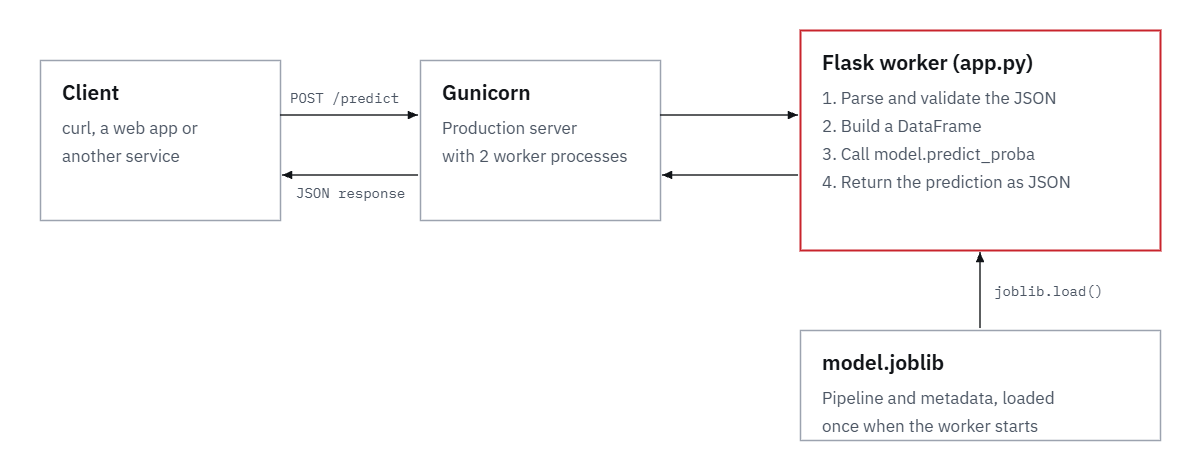
The finished project has five files:
penguin-api/
├── train.py          # trains the model and saves model.joblib
├── app.py            # the Flask API
├── test_app.py       # automated tests
├── requirements.txt  # pinned library versions
└── Dockerfile        # packages the API as a container
Install what you need, ideally in a fresh virtual environment:
pip install flask gunicorn scikit-learn pandas seaborn joblib pytest requestsStep 1: Train the model and save it
The most important decision happens before Flask is involved: save the whole pipeline, not just the model. A scikit-learn Pipeline bundles the preprocessing (filling missing values, scaling numbers, one-hot encoding text columns) with the classifier. The API can then pass raw input straight in, and it’s impossible for the server to prepare data differently from training, which is one of the most common causes of a deployed model quietly giving wrong answers.
import joblib
import seaborn as sns
import sklearn
from sklearn.compose import ColumnTransformer
from sklearn.impute import SimpleImputer
from sklearn.linear_model import LogisticRegression
from sklearn.metrics import accuracy_score
from sklearn.model_selection import train_test_split
from sklearn.pipeline import Pipeline, make_pipeline
from sklearn.preprocessing import OneHotEncoder, StandardScaler

NUMERIC = ["bill_length_mm", "bill_depth_mm", "flipper_length_mm", "body_mass_g"]
CATEGORICAL = ["island", "sex"]

df = sns.load_dataset("penguins").dropna(subset=["species"] + NUMERIC)
X, y = df[NUMERIC + CATEGORICAL], df["species"]
X_train, X_test, y_train, y_test = train_test_split(
    X, y, test_size=0.25, stratify=y, random_state=42
)

preprocess = ColumnTransformer([
    ("num", make_pipeline(SimpleImputer(strategy="median"), StandardScaler()), NUMERIC),
    ("cat", make_pipeline(SimpleImputer(strategy="most_frequent"),
                          OneHotEncoder(handle_unknown="ignore")), CATEGORICAL),
])
model = Pipeline([
    ("preprocess", preprocess),
    ("classifier", LogisticRegression(max_iter=1000)),
])
model.fit(X_train, y_train)
accuracy = accuracy_score(y_test, model.predict(X_test))
print(f"Rows: {len(df)}, test accuracy: {accuracy:.3f}")

joblib.dump({
    "model": model,
    "numeric": NUMERIC,
    "categorical": CATEGORICAL,
    "categories": {c: sorted(X[c].dropna().unique().tolist()) for c in CATEGORICAL},
    "version": "1.0.0",
    "sklearn_version": sklearn.__version__,
    "test_accuracy": round(accuracy, 3),
}, "model.joblib")
print("Saved model.joblib")
Output:
Rows: 342, test accuracy: 1.000
Saved model.joblib
The penguin species are easy to tell apart, so the model gets all 86 test penguins right (5-fold cross-validation gives 99.4%). Your own models will be less accurate; the point here is the deployment, which works the same either way.
Notice what goes into model.joblib besides the model: the feature names, the allowed categories, a version number and the scikit-learn version. The API uses all of them, and you’ll be glad of the version numbers the first time you need to know which model produced a prediction. For more on building the model itself, see how to build a machine learning model with scikit-learn.
Step 2: Build the Flask API
The API has two endpoints: GET /health, which tells a load balancer or hosting platform that the app is running, and POST /predict, which does the work.
import joblib
import pandas as pd
from flask import Flask, jsonify, request

# Load the model once, when the app starts, not on every request.
bundle = joblib.load("model.joblib")
model = bundle["model"]
NUMERIC = bundle["numeric"]
CATEGORICAL = bundle["categorical"]
CATEGORIES = bundle["categories"]
FEATURES = NUMERIC + CATEGORICAL
MAX_BATCH = 1000

app = Flask(__name__)


def validate(record):
    """Return a list of problems with one input record (empty if it's fine)."""
    if not isinstance(record, dict):
        return ["each record must be a JSON object"]
    errors = []
    for name in FEATURES:
        if name not in record:
            errors.append(f"missing field '{name}'")
    for name in NUMERIC:
        value = record.get(name)
        if name in record and (isinstance(value, bool) or not isinstance(value, (int, float))):
            errors.append(f"'{name}' must be a number")
    for name in CATEGORICAL:
        value = record.get(name)
        if name in record and value not in CATEGORIES[name]:
            errors.append(f"'{name}' must be one of {CATEGORIES[name]}")
    return errors


@app.get("/health")
def health():
    return jsonify(status="ok", model_version=bundle["version"])


@app.post("/predict")
def predict():
    payload = request.get_json(silent=True)
    if payload is None:
        return jsonify(error="Send a JSON body with Content-Type: application/json"), 400

    records = payload if isinstance(payload, list) else [payload]
    if not records or len(records) > MAX_BATCH:
        return jsonify(error=f"Send between 1 and {MAX_BATCH} records"), 400

    problems = {i: errs for i, rec in enumerate(records) if (errs := validate(rec))}
    if problems:
        return jsonify(error="Invalid input", details=problems), 422

    X = pd.DataFrame(records, columns=FEATURES)
    labels = model.predict(X)
    probabilities = model.predict_proba(X)

    results = [
        {
            "species": label,
            "probabilities": {
                cls: round(float(p), 4) for cls, p in zip(model.classes_, probs)
            },
        }
        for label, probs in zip(labels, probabilities)
    ]
    return jsonify(predictions=results, model_version=bundle["version"])


@app.errorhandler(404)
@app.errorhandler(405)
def http_error(e):
    return jsonify(error=e.description), e.code


if __name__ == "__main__":
    app.run(port=5000, debug=True)  # development only
The parts that matter most in production:
- The model is loaded once, when the app starts. Loading it inside
predict()would repeat the work on every request. That costs under a millisecond for this small file but seconds for a large model. - Input is validated before it reaches the model. A missing field or a number sent as text would otherwise produce a confusing error from deep inside scikit-learn, or worse, a wrong prediction. Bad requests get a clear message and status code 422; a body that isn’t JSON gets 400.
- One request can hold one record or a list. Batching is far faster than sending records one at a time, as the timings below show.
MAX_BATCHstops anyone sending a million rows at once. - The response includes probabilities and the model version, so the caller can decide what to do with uncertain predictions and you can trace every answer back to a model.
- Errors come back as JSON, not Flask’s default HTML pages, which are awkward for programs to read.
Step 3: Run it and send a prediction
Start Flask’s built-in development server:
python app.py * Serving Flask app 'app'
* Debug mode: on
WARNING: This is a development server. Do not use it in a production deployment. Use a production WSGI server instead.
* Running on http://127.0.0.1:5000In a second terminal, send a penguin with curl:
curl -X POST http://127.0.0.1:5000/predict \
  -H "Content-Type: application/json" \
  -d '{"bill_length_mm": 46.5, "bill_depth_mm": 14.8, "flipper_length_mm": 217,
       "body_mass_g": 5200, "island": "Biscoe", "sex": "Female"}'
Output:
{"model_version":"1.0.0","predictions":[{"probabilities":{"Adelie":0.0009,"Chinstrap":0.0023,"Gentoo":0.9968},"species":"Gentoo"}]}The model is 99.7% sure this is a Gentoo. From Python, use the requests library. Here two penguins go in one request:
import requests

penguins = [
    {"bill_length_mm": 39.1, "bill_depth_mm": 18.7, "flipper_length_mm": 181,
     "body_mass_g": 3750, "island": "Torgersen", "sex": "Male"},
    {"bill_length_mm": 49.5, "bill_depth_mm": 19.0, "flipper_length_mm": 200,
     "body_mass_g": 3800, "island": "Dream", "sex": "Male"},
]
response = requests.post("http://127.0.0.1:5000/predict", json=penguins, timeout=10)
for p in response.json()["predictions"]:
    print(p["species"], p["probabilities"])
Output:
Adelie {'Adelie': 0.9993, 'Chinstrap': 0.0006, 'Gentoo': 0.0001}
Chinstrap {'Adelie': 0.0348, 'Chinstrap': 0.96, 'Gentoo': 0.0052}
Now send something broken: a number in quotes, a missing field and a misspelled island.
curl -i -X POST http://127.0.0.1:5000/predict \
  -H "Content-Type: application/json" \
  -d '{"bill_length_mm": "46.5", "flipper_length_mm": 217, "body_mass_g": 5200,
       "island": "Biscay", "sex": "Female"}'
Output:
HTTP/1.1 422 UNPROCESSABLE ENTITY
Content-Type: application/json

{"details":{"0":["missing field 'bill_depth_mm'","'bill_length_mm' must be a number","'island' must be one of ['Biscoe', 'Dream', 'Torgersen']"]},"error":"Invalid input"}
Every problem is reported at once, with the index of the record it belongs to, so whoever is calling the API can fix their request without guessing. If you want to read long JSON responses comfortably, paste them into our JSON formatter.
Step 4: Test the API automatically
Flask’s test client sends requests to the app without starting a server, so tests run in about a second. Save this as test_app.py:
import pytest

from app import app

PENGUIN = {
    "bill_length_mm": 46.5, "bill_depth_mm": 14.8, "flipper_length_mm": 217,
    "body_mass_g": 5200, "island": "Biscoe", "sex": "Female",
}


@pytest.fixture
def client():
    return app.test_client()


def test_health(client):
    response = client.get("/health")
    assert response.status_code == 200
    assert response.get_json()["status"] == "ok"


def test_single_prediction(client):
    response = client.post("/predict", json=PENGUIN)
    assert response.status_code == 200
    result = response.get_json()["predictions"][0]
    assert result["species"] == "Gentoo"
    assert abs(sum(result["probabilities"].values()) - 1) < 0.001


def test_batch_prediction(client):
    response = client.post("/predict", json=[PENGUIN, PENGUIN])
    assert len(response.get_json()["predictions"]) == 2


def test_missing_field(client):
    bad = {k: v for k, v in PENGUIN.items() if k != "body_mass_g"}
    response = client.post("/predict", json=bad)
    assert response.status_code == 422
    assert "missing field 'body_mass_g'" in response.get_json()["details"]["0"]


def test_wrong_type(client):
    response = client.post("/predict", json={**PENGUIN, "flipper_length_mm": "217"})
    assert response.status_code == 422


def test_not_json(client):
    response = client.post("/predict", data="hello")
    assert response.status_code == 400
pytest -qOutput:
......                                                                   [100%]
6 passed in 1.46s
Run the tests every time you retrain the model or change the code. If a new model starts predicting a different species for the reference penguin, test_single_prediction fails before the change reaches users. Running tests automatically on every push is easy with GitHub Actions; our GitHub for data science guide covers the basics.
Step 5: Serve it with Gunicorn
Look again at the warning Flask printed: the built-in server is for development only. It isn’t designed for speed, stability or security, and with debug=True it exposes an interactive debugger that can run Python code on your server, protected only by a PIN printed in the console. In production, run the app with a WSGI server such as Gunicorn:
gunicorn --workers 2 --bind 0.0.0.0:8000 app:app[INFO] Starting gunicorn 26.2.0
[INFO] Listening at: http://0.0.0.0:8000
[INFO] Using worker: sync
[INFO] Booting worker with pid: 5203
[INFO] Booting worker with pid: 5204app:app means “the object called app in the file app.py“. Each worker is a separate process with its own copy of the model, so two workers can handle two requests at the same time. Gunicorn’s documentation suggests starting with (2 × CPU cores) + 1 workers; with a large model, memory usually sets the limit first. Adding --preload loads the app before the workers start, so they share memory for the model. Gunicorn runs on Linux and macOS; on Windows, use waitress instead, or run the Docker container from the next step.
How fast is it? We sent 500 single-penguin requests and 20 batches of 1,000 penguins to Gunicorn on the same machine (2 CPU cores):
| Request | Median time | 95th percentile |
|---|---|---|
| 1 penguin | 10.2 ms | 13.3 ms |
| 1,000 penguins in one request | 21.7 ms (0.02 ms per penguin) | – |
A single prediction takes about 10 ms, mostly overhead: HTTP, JSON and building a one-row DataFrame. That overhead is paid once per request, so a batch of 1,000 takes only twice as long as one penguin. When we sent 1,000 penguins as 1,000 separate requests, it took about 10 seconds; as one batch, about 0.02 seconds. If you need to score many records, batch them.
Step 6: Package it with Docker
Your API now works on your machine. To make it run the same way on a server, package it with its exact dependencies. First, pin the library versions:
flask==3.1.3
gunicorn==26.2.0
joblib==1.6.0
numpy==2.5.3
pandas==3.0.5
scikit-learn==1.9.1
Pinning scikit-learn matters more than it looks. A saved model is a pickle of Python objects, and loading it with a different scikit-learn version can fail or give different results. Scikit-learn warns with InconsistentVersionWarning when versions don’t match. Train and serve with the same version, which is why train.py stores it in the bundle.
Then the Dockerfile:
FROM python:3.13-slim

WORKDIR /app
COPY requirements.txt .
RUN pip install --no-cache-dir -r requirements.txt

COPY app.py model.joblib ./

EXPOSE 8000
CMD ["gunicorn", "--workers", "2", "--bind", "0.0.0.0:8000", "app:app"]
Build the image and run it:
docker build -t penguin-api .
docker run -p 8000:8000 penguin-api
curl http://127.0.0.1:8000/health
The image contains Python, the pinned libraries, the code and the model, and nothing else. Training code, notebooks and data stay out. If Docker is new to you, start with our Docker for data science tutorial.
Step 7: Deploy it to a server
A container image runs almost anywhere. The common choices:
- A managed container service such as Google Cloud Run, AWS App Runner, Azure Container Apps, Render or Fly.io. You push the image, tell the service the app listens on port 8000 and point its health check at
/health. It handles HTTPS, restarts and scaling. This is the easiest option for most teams. - A virtual machine (an AWS EC2 instance, a DigitalOcean droplet). You run the container, or Gunicorn directly, behind a reverse proxy such as Nginx that handles HTTPS. More control, more maintenance.
- Kubernetes, if your organization already runs it. The same image works there.
Whichever you pick, the steps are the same: build the image, push it to a registry the platform can read, set any secrets as environment variables and check /health after each deployment. Our guide to AWS for data science introduces the AWS services involved.
Before you go live: a production checklist
A public URL that runs a model needs a few protections. This addition to app.py requires an API key on every request except the health check, and rejects request bodies over 1 MB:
import hmac
import os

API_KEY = os.environ["API_KEY"]                 # set on the server, never in code
app.config["MAX_CONTENT_LENGTH"] = 1_000_000    # reject request bodies over 1 MB


@app.before_request
def require_api_key():
    if request.path == "/health":
        return None
    sent = request.headers.get("X-API-Key", "")
    if not hmac.compare_digest(sent, API_KEY):
        return jsonify(error="Missing or wrong API key"), 401


@app.errorhandler(413)
def too_large(e):
    return jsonify(error="Request body is too large"), 413
Without a key the API now answers 401 {"error": "Missing or wrong API key"}, and an oversized request gets 413. hmac.compare_digest compares the keys in constant time, which avoids leaking the key through response timing. The rest of the checklist:
- Debug mode off. Never run with
debug=Trueor the development server where others can reach it. - Only load model files you created. Loading a pickle or joblib file can run arbitrary code, so never load one uploaded by a user or downloaded from an untrusted source.
- HTTPS. Managed platforms provide it; on a VM, put Nginx or a load balancer in front.
- Logging. Log each request’s inputs, prediction, model version and response time. You’ll need them to debug complaints and to notice when incoming data drifts away from the training data, the usual reason a deployed model gets worse over time.
- Version every model. Bump
versionintrain.pyfor every retrain and keep the previous file, so you can roll back by redeploying the old image. - CORS, only if a browser calls the API directly from another domain. The
flask-corspackage handles it; servers calling your API don’t need it.
Common errors and how to fix them
| Error | Cause and fix |
|---|---|
415 Unsupported Media Type | You used request.json and the client didn’t send Content-Type: application/json. Add the header (in curl: -H "Content-Type: application/json") or read the body with request.get_json(silent=True) as this app does. |
ValueError: columns are missing: {'body_mass_g'} | The DataFrame passed to the pipeline lacks a column the model was trained on. Validate input first and build the DataFrame with columns=FEATURES. |
ValueError: Specifying the columns using strings is only supported for dataframes. | You passed a NumPy array or a list to a pipeline whose ColumnTransformer selects columns by name. Pass a pandas DataFrame. |
InconsistentVersionWarning | The model was saved with a different scikit-learn version than the server has. Pin the same version in requirements.txt, or retrain with the server’s version. |
Address already in use | Another process, often an earlier copy of the app, is using the port. Stop it or choose another port with --bind. |
ModuleNotFoundError: No module named 'app' | Gunicorn was started from the wrong folder. Run it from the folder that contains app.py. |
Flask or FastAPI?
FastAPI is a popular alternative. It validates input with type hints, generates interactive API documentation automatically and handles async code well. Flask is smaller, older and has a huge ecosystem, and its explicit style makes it easy to see exactly what happens to a request, which is why it’s a good way to learn deployment. For a model API like this one, either works well. The parts that matter most, saving the whole pipeline, validating input, batching, pinning versions and testing, are the same in both.
Related tutorials
- Build a machine learning model with scikit-learn
- Docker for data science
- TensorFlow for beginners
- How to use APIs to collect data
- Random forests explained
The official Flask documentation covers routing, request handling and deployment options in more depth.
FAQ
How do I deploy a machine learning model with Flask?
Train the model and save the whole pipeline with joblib. Write a Flask app that loads the file once at start-up and exposes a /predict endpoint that validates JSON input and returns predictions. Test it, run it with Gunicorn instead of Flask’s development server, package it with Docker and run the container on a cloud service or server.
Can I deploy a TensorFlow or PyTorch model the same way?
Yes. Replace joblib.load with keras.saving.load_model or torch.load, load it once at start-up, and convert the validated input into the tensor shape the model expects. Deep learning models are larger, so watch memory per Gunicorn worker. See our TensorFlow tutorial for saving a Keras model.
How many requests can a Flask model API handle?
It depends on the model and the hardware. This small model answered a single prediction in about 10 ms with 2 workers on 2 CPU cores. Add workers or machines to handle more requests at once, and batch records wherever you can.
Where can I host a Flask API for free?
Several platforms, including Render and Google Cloud Run, have free tiers or free credits that are enough for a small demo API. Limits and terms change often, so check each provider’s current pricing page before you rely on one.
Is it safe to load a model with pickle or joblib?
Only if you created the file. Loading a pickle can execute code, so never load model files from users or untrusted downloads.
Do I need Docker to deploy a Flask app?
No. You can install the requirements and run Gunicorn directly on a server. Docker makes the environment reproducible, so the app runs the same way on your laptop, in testing and in production.
