
Much of the data worth analysing never comes as a file. Weather, prices, social posts, company records and software statistics sit behind APIs, and a few lines of Python are enough to collect them. This tutorial shows how to use APIs to collect data, step by step: make a request, read the JSON, send parameters, handle errors and rate limits, page through results and finish with a clean table you can analyse.
Both APIs used here are free and need no account or key, so you can run every block as it is. The outputs are from our run on 13 November 2026. The data is live, so your numbers will be a little different.
What is an API?
An API (application programming interface) is a way for one program to ask another for data or a service. A web API works like a website made for programs: your code sends a request to a URL, and the server sends back data instead of a page. That data is usually JSON, a text format built from the same pieces as Python dictionaries and lists.
| Term | Meaning |
|---|---|
| Endpoint | The URL you send a request to. One API usually has many, one per kind of data. |
| Method | What you want to do. GET reads data and is the one you need for collecting it; POST sends data. |
| Parameters | Options added to the request, such as a search term, a date range or a page number. |
| Headers | Extra information sent with a request or a response, such as your API key or how many requests you have left. |
| Status code | A number that says how the request went: 200 means success, 404 not found, 429 too many requests. |
| API key or token | A secret string that identifies you. Many APIs need one; the two in this tutorial do not. |
| Rate limit | The number of requests you are allowed in a period of time. |
Most APIs you will meet are REST APIs, which use plain URLs and the methods above. You may also see GraphQL, where one endpoint accepts a query describing exactly the fields you want. The steps below are for REST, and the habits carry over.
Step by step: collect data from an API with Python
You need Python with three libraries. Requests sends the HTTP requests, pandas turns the results into tables and Matplotlib draws one chart. If Python is not installed yet, start with installing Python and Jupyter Notebook.
pip install requests pandas matplotlib1. Make your first request
PyPI, the site that hosts Python packages, has a simple JSON API: one URL per package. Ask it about pandas:
import requests

response = requests.get("https://pypi.org/pypi/pandas/json", timeout=10)

print(response.status_code)
print(response.headers["Content-Type"])
Output:
200
application/json
The status code 200 means the request worked, and the content type says the answer is JSON. The timeout=10 argument matters more than it looks: without it, a request to a server that never answers will hang your script for good. Set a timeout on every request.
2. Read the JSON
The .json() method turns the response into Python objects. Before using it, look at its shape:
data = response.json()

print(type(data), list(data.keys()))
info = data["info"]
print(info["name"], info["version"])
print(info["summary"][:60])
print("Needs Python", info["requires_python"])
Output:
<class 'dict'> ['info', 'last_serial', 'ownership', 'releases', 'urls', 'vulnerabilities']
pandas 3.1.1
Powerful data structures for data analysis, time series, and
Needs Python >=3.11
The response is a dictionary with six keys. info holds the package details, and releases holds every version ever published. Exploring a response like this, one level at a time, is how you learn any new API. To inspect a large response by eye, paste it into our JSON formatter.
3. Turn nested JSON into a table
API data is nested: dictionaries inside lists inside dictionaries. Analysis needs rows and columns. The usual pattern is a loop that picks the fields you want from each item and builds a list of flat dictionaries, which pandas turns into a DataFrame:
import pandas as pd

rows = []
for version, files in data["releases"].items():
    if files:                                  # a few old versions have no files
        rows.append({"version": version,
                     "released": files[0]["upload_time_iso_8601"],
                     "files": len(files)})

releases = pd.DataFrame(rows)
releases["released"] = pd.to_datetime(releases["released"])
releases = releases.sort_values("released").reset_index(drop=True)

print(len(releases), "releases")
print(releases.tail(3).to_string(index=False))
print(releases.groupby(releases["released"].dt.year).size().tail(5).to_string())
Output:
121 releases
 version                         released  files
3.1.0rc0 2026-09-30 13:55:10.637378+00:00     58
   3.1.0 2026-10-22 11:54:48.330970+00:00     58
   3.1.1 2026-11-04 15:05:30.116324+00:00     58
released
2022     8
2023    10
2024     4
2025     6
2026    11
One request has become a tidy table of 121 pandas releases with dates, and one line of pandas counts them per year. Note the if files check: real API data has gaps, and here a few old versions have no files at all. For more on reshaping tables, see data manipulation with pandas.
4. Send parameters
Most endpoints accept parameters that filter or sort the results. The GitHub search API takes a search query q, a sort order and a page size. Pass them as a dictionary and Requests builds the URL for you:
URL = "https://api.github.com/search/repositories"
params = {"q": "topic:data-science", "sort": "stars", "order": "desc", "per_page": 3}

response = requests.get(URL, params=params, timeout=10)
print(response.url)

result = response.json()
print(f"{result['total_count']:,} repositories match")
for repo in result["items"]:
    print(f"{repo['full_name']:<32} {repo['stargazers_count']:>7,} stars  {repo['language']}")
Output:
https://api.github.com/search/repositories?q=topic%3Adata-science&sort=stars&order=desc&per_page=3
87,400 repositories match
microsoft/ML-For-Beginners        92,167 stars  Jupyter Notebook
Asabeneh/30-Days-Of-Python        78,693 stars  Python
apache/superset                   75,513 stars  Python
The printed URL shows what was actually sent: the parameters follow a question mark, and the colon in the query was encoded as %3A. Letting Requests do this avoids broken URLs when a value contains spaces or symbols. The response says 87,400 repositories carry the data-science topic and returns the first three.
5. Check for errors
Requests does not raise an error when the server says no. It hands you the response and moves on, so a script can run to the end on error pages. See what two bad requests return:
for url, params in [("https://pypi.org/pypi/not-a-real-package-xyz/json", None),
                    (URL, {"q": ""})]:
    r = requests.get(url, params=params, timeout=10)
    print(r.status_code, r.reason)

try:
    r.raise_for_status()
except requests.HTTPError as error:
    print("Stopped:", str(error)[:60])
Output:
404 Not Found
422 Unprocessable Entity
Stopped: 422 Client Error: Unprocessable Entity for url: https://api.
A package that does not exist gives 404, and an empty search gives 422, which means the server understood the request but could not process it. Calling raise_for_status() turns any 4xx or 5xx answer into a Python exception, so the problem stops your code at the right place.
| Code | Meaning | What to do |
|---|---|---|
| 200 | Success | Use the data. |
| 400, 422 | Bad request | Fix your parameters; retrying will not help. |
| 401, 403 | Not authorised or forbidden | Check your API key and permissions. Some APIs also use 403 for rate limits. |
| 404 | Not found | Check the URL or the ID you asked for. |
| 429 | Too many requests | Wait, then try again more slowly. |
| 500, 502, 503 | Server problem | Wait a few seconds and retry. |
6. Write one function that handles limits and retries
Every API limits how fast you may call it. GitHub, for example, allows 10 search requests a minute without a token and 30 with one, and it reports what you have left in response headers. Rather than repeat the checks everywhere, wrap them in one function:
import time

def get_json(url, params=None, headers=None, retries=3):
    """GET a URL and return the JSON, waiting and retrying when the server asks us to."""
    for attempt in range(retries):
        r = requests.get(url, params=params, headers=headers, timeout=10)
        if r.status_code in (403, 429) and r.headers.get("X-RateLimit-Remaining") == "0":
            wait = max(int(r.headers["X-RateLimit-Reset"]) - time.time(), 0) + 1
            print(f"Rate limit reached, waiting {wait:.0f} seconds")
            time.sleep(wait)
        elif r.status_code >= 500:
            time.sleep(2 ** attempt)           # server trouble: wait 1, 2, 4 seconds
        else:
            r.raise_for_status()               # any other error is our mistake: stop
            return r.json()
    raise RuntimeError(f"No answer from {url} after {retries} tries")

print(get_json("https://pypi.org/pypi/requests/json")["info"]["version"])
Output:
2.34.2The function does three things. If the rate limit is used up, it reads the reset time from the headers and waits. That reset time is a Unix timestamp, a count of seconds you can decode with our Unix timestamp converter. If the server has a problem, it waits a little longer on each attempt and tries again. For any other error it stops at once, because a bad URL or a wrong parameter will not fix itself.
7. Keep API keys out of your code
Many APIs need a key or token, usually sent in a header. Never type it into a script or notebook: code gets shared, and automated scanners quickly find keys pushed to public repositories. Store the key in an environment variable and read it at run time:
import os

token = os.environ.get("GITHUB_TOKEN")         # set this outside your code, never inside it
headers = {"Accept": "application/vnd.github+json"}
if token:
    headers["Authorization"] = f"Bearer {token}"

print("Token found:", token is not None)
Output:
Token found: FalseNo token was set for this run, so the requests below go out without one, which is enough for this project. On your own machine you would set the variable in the terminal before starting Python, or keep it in a .env file that is listed in .gitignore. Our Git and GitHub tutorial covers that file.
8. Page through the results
APIs return large results in pages. GitHub gives at most 100 repositories per request, so collecting the 300 most starred data science projects takes three requests with a rising page number:
repos = []
for page in range(1, 4):
    result = get_json(URL, headers=headers,
                      params={"q": "topic:data-science", "sort": "stars",
                              "order": "desc", "per_page": 100, "page": page})
    repos.extend(result["items"])
    print(f"page {page}: {len(result['items'])} repositories, {len(repos)} so far")
    time.sleep(2)                              # be polite between requests
Output:
page 1: 100 repositories, 100 so far
page 2: 100 repositories, 200 so far
page 3: 100 repositories, 300 so far
The short pause between requests keeps the script well inside the limit. Two things to check in any API’s documentation before paging: the largest page size, and the total it will let you reach. GitHub search stops at 1,000 results however many match, so a bigger collection needs narrower queries, for example one per year.
9. Build the dataset and save it
Each repository comes back with about 80 fields. Keep the ones you need, flatten the nested license field and convert the dates:
df = pd.DataFrame([{
    "name": r["full_name"],
    "stars": r["stargazers_count"],
    "forks": r["forks_count"],
    "language": r["language"],
    "license": r["license"]["spdx_id"] if r["license"] else None,
    "created": r["created_at"],
    "pushed": r["pushed_at"],
    "archived": r["archived"],
} for r in repos])
df["created"] = pd.to_datetime(df["created"])
df["pushed"] = pd.to_datetime(df["pushed"])

print(df.shape, "duplicates:", df["name"].duplicated().sum())
print(df.head(3)[["name", "stars", "language", "license"]].to_string(index=False))
df.to_csv("data_science_repos.csv", index=False)
Output:
(300, 8) duplicates: 0
                      name  stars         language    license
microsoft/ML-For-Beginners  92167 Jupyter Notebook        MIT
Asabeneh/30-Days-Of-Python  78693           Python        NaN
           apache/superset  75513           Python Apache-2.0
The check for duplicates is worth keeping. When results are sorted by something that changes, such as stars, an item can move between pages while you collect and appear twice or not at all. Saving to CSV straight away means you can analyse the data as often as you like without calling the API again.
10. Analyse what you collected
print(f"Median stars: {df['stars'].median():,.0f}")
print(df["language"].fillna("None listed").value_counts().head(6).to_string())

print(f"No license listed: {df['license'].isna().mean():.0%}")
year_ago = pd.Timestamp.now(tz="UTC") - pd.DateOffset(years=1)
print(f"No code pushed in the last year: {(df['pushed'] < year_ago).mean():.0%}")
print(f"Archived by the owner: {df['archived'].mean():.0%}")
Output:
Median stars: 4,798
language
Python              133
Jupyter Notebook     67
None listed          40
TypeScript           13
C++                  10
HTML                  6
No license listed: 15%
No code pushed in the last year: 37%
Archived by the owner: 5%
import matplotlib.pyplot as plt
top = df["language"].fillna("None listed").value_counts().head(6)[::-1]
fig, ax = plt.subplots(figsize=(8, 4))
bars = ax.barh(top.index, top.values, color="#c3cad3")
bars[-1].set_color("#c8242c")
ax.bar_label(bars, padding=4)
ax.set_xlabel("Repositories (of the 300 most starred)")
ax.set_title("Main language of top data science repositories on GitHub")
ax.spines[["top", "right"]].set_visible(False)
fig.savefig("languages.png", dpi=150, bbox_inches="tight")
plt.show()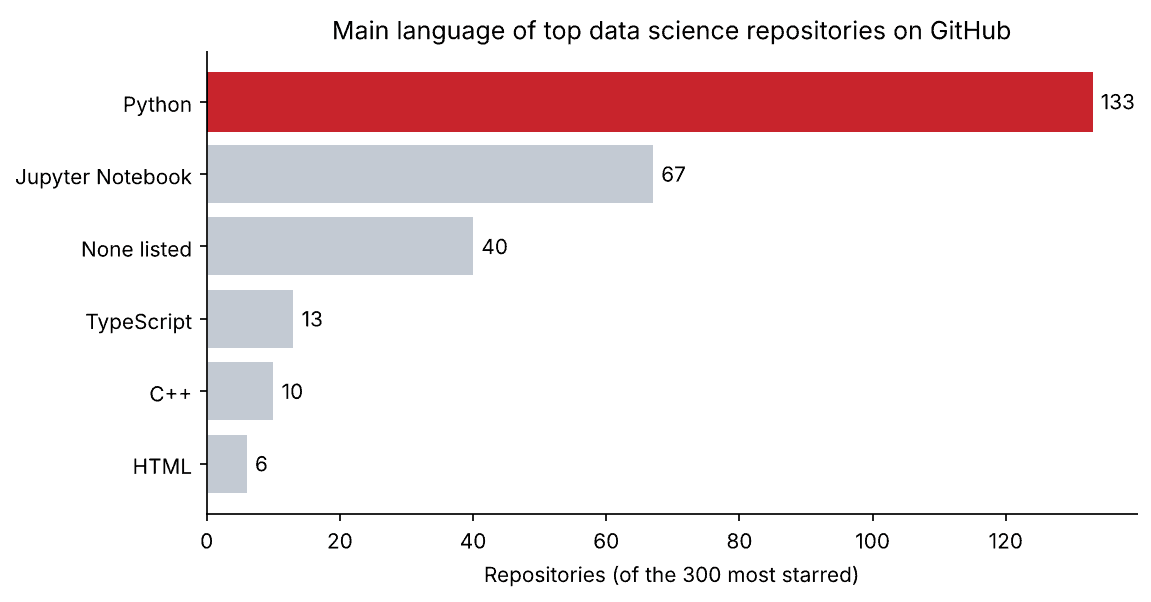
Of the 300 most starred data science repositories, 133 are mainly Python and 67 are Jupyter notebooks. The 40 with no language are mostly reading lists and collections of links. Two findings matter if you plan to depend on any of these projects: 15% list no license, which legally means you may not be allowed to reuse the code, and 37% have had no code pushed in the past year. Stars measure past popularity, not present upkeep.
That is a complete API project: a question, under 100 lines of code and a dataset nobody handed you. The next steps are the usual ones, cleaning the data and exploring it.
Good habits when you use APIs to collect data
- Read the documentation and the terms first. They tell you the limits, the page sizes and what you may do with the data.
- Always set a timeout and check the status code of every response.
- Slow down. Pause between requests and obey the rate-limit headers. Hammering an API gets your key or IP address blocked.
- Save the raw responses or the first clean table to disk before analysing, so a mistake later does not mean collecting everything again.
- Keep keys secret, in environment variables, never in code.
- Expect gaps. Fields can be missing or empty, as the license field was here. Write code that copes.
- Record when you collected the data. API data changes, and a date makes your analysis repeatable.
When a collection job has to run every day, it becomes a pipeline. Our guide to data pipelines covers scheduling and monitoring.
Free APIs to practise with
| API | Data | Key needed? |
|---|---|---|
| PyPI JSON API | Python packages, versions and release dates | No |
| GitHub REST API | Repositories, issues, users and commits | No for light use; a free token raises the limits |
| Open-Meteo | Weather forecasts and historical weather | No for non-commercial use |
| World Bank Indicators API | Economic and development statistics by country | No |
| Wikimedia Pageviews API | Daily page views for Wikipedia articles | No |
| NASA APIs | Space images, asteroids and Earth data | Free key; a shared demo key works for a few requests |
Related reading
- Data manipulation with pandas
- Clean and preprocess data in Python
- Analyse a real-world dataset with Python
- Git and GitHub for data science
- CSV to JSON converter
FAQ
How do I use an API to collect data in Python?
Install the requests library, send a GET request to the API’s endpoint with any parameters, check that the status code is 200, convert the response with .json(), pick the fields you need into a list of dictionaries and load that into a pandas DataFrame.
Do I need an API key?
It depends on the API. Many public APIs, including the PyPI and GitHub APIs used in this tutorial, allow light use without one. Others need a free or paid key, which you send in a header or a parameter.
What is the difference between an API and web scraping?
An API is an official way to get data in a structured format, with documented rules. Web scraping pulls data out of pages made for people. Use the API when one exists: it is more reliable, faster and clearer about what you are allowed to do.
What is a rate limit?
The number of requests an API allows in a period of time, such as 10 a minute. If you go over it, the API answers with status 429 or 403 until the period resets. Good code reads the limit from the response headers and waits.
What is pagination in an API?
Pagination means the API returns a large result in pages of limited size. You request page 1, page 2 and so on, or follow a link to the next page, until there are no more results.
Is it legal to collect data from an API?
Using a public API within its terms of service is generally fine, but the terms decide what you may store, share or sell, and personal data is also covered by privacy law. Read the terms before you build on an API.
