
Hadoop is the system that made big data practical: it stores files too large for one machine across many ordinary computers and processes them in parallel. This tutorial explains Hadoop for big data analysis in plain language, then has you write a real MapReduce job in Python and run it on a real web server log.
You do not need a cluster to follow along. Hadoop jobs can be written as two small Python scripts and tested on any laptop with a few shell commands, which is how they are developed in practice. Every output below is from running the code shown, and the last section shows the commands that send the same scripts to a real cluster.
What is Hadoop?
Apache Hadoop is open-source software for storing and processing very large datasets on a group of computers, called a cluster. Instead of buying one huge, expensive machine, you connect many ordinary ones, and Hadoop makes them behave like a single system. If one machine fails, the work carries on, because Hadoop keeps copies of the data and reruns the failed part elsewhere.
It has three main parts:
| Part | What it does | Think of it as |
|---|---|---|
| HDFS (Hadoop Distributed File System) | Splits each file into large blocks (128 MB by default) and stores every block on several machines, three by default. | The storage |
| MapReduce | A way of writing a job as two steps, map and reduce, that Hadoop can run on all the blocks at once. | The processing model |
| YARN | Decides which machine runs which task and how much memory and CPU each one gets. | The scheduler |
The idea behind all three is simple: move the code to the data, not the data to the code. Copying a huge file across a network is slow, so Hadoop sends your small program to each machine that holds a block and runs it there. For the wider picture of when data counts as big, see big data vs small data.
How MapReduce works
A MapReduce job has three stages. You write the first and the last; Hadoop does the middle one.
- Map. Each machine reads its block of the input, line by line, and outputs key and value pairs. For example: for each request in a log, output the status code and the number 1.
- Shuffle and sort. Hadoop gathers the pairs from every machine and sorts them, so that all pairs with the same key arrive together at the same reducer.
- Reduce. For each key, combine its values into a result. For example: add up the 1s to count requests per status code.
Because each line is mapped on its own and each key is reduced on its own, the work can be spread over any number of machines. That one restriction is the source of Hadoop’s scale.
Hadoop for big data analysis: a MapReduce job in Python
Hadoop itself is written in Java, but a feature called Hadoop Streaming lets you write the mapper and the reducer in any language. The rule is simple: each script reads lines from standard input and prints lines to standard output, with the key and the value separated by a tab. That makes the scripts easy to test without Hadoop, because the shell can play Hadoop’s role: cat feeds the data in, and sort does the shuffle.
You need Python 3 and a terminal with the standard Unix tools (Linux, macOS, or WSL on Windows). The chart at the end also uses pandas and Matplotlib.
1. Get the data
The data is a real Apache web server log with 10,000 requests from May 2015, published in the Elastic examples repository. Log analysis is the classic Hadoop job: large sites produce billions of these lines a day.
curl -L -o apache_logs "https://raw.githubusercontent.com/elastic/examples/master/Common%20Data%20Formats/apache_logs/apache_logs"
wc -l apache_logs
head -n 1 apache_logs | cut -c 1-120
Output:
10000 apache_logs
83.149.9.216 - - [17/May/2015:10:05:03 +0000] "GET /presentations/logstash-monitorama-2013/images/kibana-search.png HTTP
Each line is one request: the visitor’s IP address, the time, the request itself, the status code the server returned and the number of bytes sent.
2. Write the mapper
The first question is a simple one: how many requests ended with each status code? The mapper turns every log line into a pair, the status code and a 1.
Save this as mapper.py:
#!/usr/bin/env python3
"""Mapper: read log lines, emit one 'status<TAB>1' pair per request."""
import re
import sys

LINE = re.compile(r'^(\S+) \S+ \S+ \[([^\]]+)\] "(\S+) (\S+)[^"]*" (\d{3}) (\S+)')

for line in sys.stdin:
    match = LINE.match(line)
    if match:
        status = match.group(5)
        print(f"{status}\t1")
    else:
        print("unparsed\t1")
Try it on the first five lines:
head -n 5 apache_logs | python3 mapper.pyOutput:
200	1
200	1
200	1
200	1
200	1
Five requests in, five pairs out. Notice what the mapper does not do: it keeps no totals and remembers nothing between lines. As a result, a thousand copies of it can run on a thousand machines without talking to each other. Lines that do not match the pattern are counted under unparsed instead of being dropped, so bad data cannot disappear silently.
3. Write the reducer
The reducer receives the pairs sorted by key, so all the 200s arrive together, then all the 206s, and so on. It only has to keep one running total and print it whenever the key changes:
Save this as reducer.py:
#!/usr/bin/env python3
"""Reducer: input arrives sorted by key, so add up values until the key changes."""
import sys

current, total = None, 0
for line in sys.stdin:
    key, value = line.rstrip("\n").split("\t")
    if key != current:
        if current is not None:
            print(f"{current}\t{total}")
        current, total = key, 0
    total += int(value)
if current is not None:
    print(f"{current}\t{total}")
This pattern matters at scale. Because the input is sorted, the reducer never holds more than one key in memory, however many billions of lines pass through it.
4. Run the job
Now connect the three stages with pipes. The sort command in the middle stands in for Hadoop’s shuffle:
cat apache_logs | python3 mapper.py | sort | python3 reducer.pyOutput:
200	9126
206	45
301	164
304	445
403	2
404	213
416	2
500	3
Of the 10,000 requests, 9,126 succeeded (status 200), 445 were answered with “not modified” (304), 213 asked for pages that do not exist (404) and 3 hit a server error (500). There is no unparsed line, so every request matched the pattern. That is a complete MapReduce job.
5. See why it scales
So far one mapper read the whole file. Hadoop would split the file into blocks and run one mapper per block. You can imitate that: cut the log into four pieces, run four mappers at the same time, then shuffle and reduce their combined output.
split -l 2500 apache_logs part_
ls part_*
for f in part_*; do python3 mapper.py < "$f" > "$f.mapped" & done; wait
cat part_*.mapped | sort | python3 reducer.py
Output:
part_aa
part_ab
part_ac
part_ad
200	9126
206	45
301	164
304	445
403	2
404	213
416	2
500	3
The totals are identical to step 4. It makes no difference how the input is divided or in what order the mappers finish, and that is the whole point: the same two scripts give the same answer on four pieces of one file or on forty thousand blocks across a data centre.
6. A second job: the most requested pages
A new question usually needs only a new mapper. To find the most visited pages, emit the page path instead of the status code, skipping failed requests and files such as images and stylesheets:
Save this as pages_mapper.py:
#!/usr/bin/env python3
"""Mapper: emit 'path<TAB>1' for every successful page request."""
import re
import sys

LINE = re.compile(r'^(\S+) \S+ \S+ \[([^\]]+)\] "(\S+) (\S+)[^"]*" (\d{3}) (\S+)')
ASSET = re.compile(r"\.(png|jpg|jpeg|gif|ico|css|js|svg|woff|ttf|txt|xml)(\?|$)", re.I)

for line in sys.stdin:
    match = LINE.match(line)
    if match and match.group(5) == "200":
        path = match.group(4).split("?")[0]
        if not ASSET.search(path):
            print(f"{path}\t1")
The reducer does not change, because it still adds up values per key. One more sort at the end ranks the results. On a cluster, that ranking would be a second small job.
cat apache_logs | python3 pages_mapper.py | sort | python3 reducer.py | sort -t$'\t' -k2,2nr | head -n 8Output:
/	575
/blog/tags/puppet	489
/projects/xdotool/	223
/projects/xdotool/xdotool.xhtml	148
/articles/dynamic-dns-with-dhcp/	135
/blog/geekery/ssl-latency.html	77
/blog/geekery/disabling-battery-in-ubuntu-vms.html	60
/blog/tags/firefox	60
7. A third job: traffic by hour
Values do not have to be 1. This mapper emits the hour of the request as the key and the bytes sent as the value, so the same reducer now totals traffic per hour of the day:
Save this as hours_mapper.py:
#!/usr/bin/env python3
"""Mapper: emit 'hour<TAB>bytes' so the reducer can total traffic per hour of day."""
import re
import sys

LINE = re.compile(r'^(\S+) \S+ \S+ \[([^\]]+)\] "(\S+) (\S+)[^"]*" (\d{3}) (\S+)')

for line in sys.stdin:
    match = LINE.match(line)
    if match:
        hour = match.group(2)[12:14]              # 17/May/2015:10:05:03 -> 10
        size = match.group(6)
        print(f"{hour}\t{size if size.isdigit() else 0}")
Save this as plot.py:
import pandas as pd
import matplotlib
matplotlib.use("Agg")
import matplotlib.pyplot as plt

hours = pd.read_csv("hours.tsv", sep="\t", names=["hour", "bytes"])
hours["mb"] = hours["bytes"] / 1024 ** 2
busiest = hours["mb"].idxmax()
print(f"Total: {hours['mb'].sum():,.0f} MB, busiest hour: {hours.loc[busiest, 'hour']:02d}:00 with {hours.loc[busiest, 'mb']:.0f} MB")

fig, ax = plt.subplots(figsize=(8, 4))
bars = ax.bar(hours["hour"], hours["mb"], color="#c3cad3")
bars[busiest].set_color("#c8242c")
ax.set_xticks(range(0, 24, 2))
ax.set_xlabel("Hour of day (UTC)")
ax.set_ylabel("Data sent (MB)")
ax.set_title("Traffic by hour, computed with a MapReduce job")
ax.spines[["top", "right"]].set_visible(False)
fig.savefig("traffic_by_hour.png", dpi=150, bbox_inches="tight")
cat apache_logs | python3 hours_mapper.py | sort | python3 reducer.py > hours.tsv
head -n 3 hours.tsv
python3 plot.pyOutput:
00	30416712
01	91349675
02	158120470
Total: 2,620 MB, busiest hour: 21:00 with 265 MB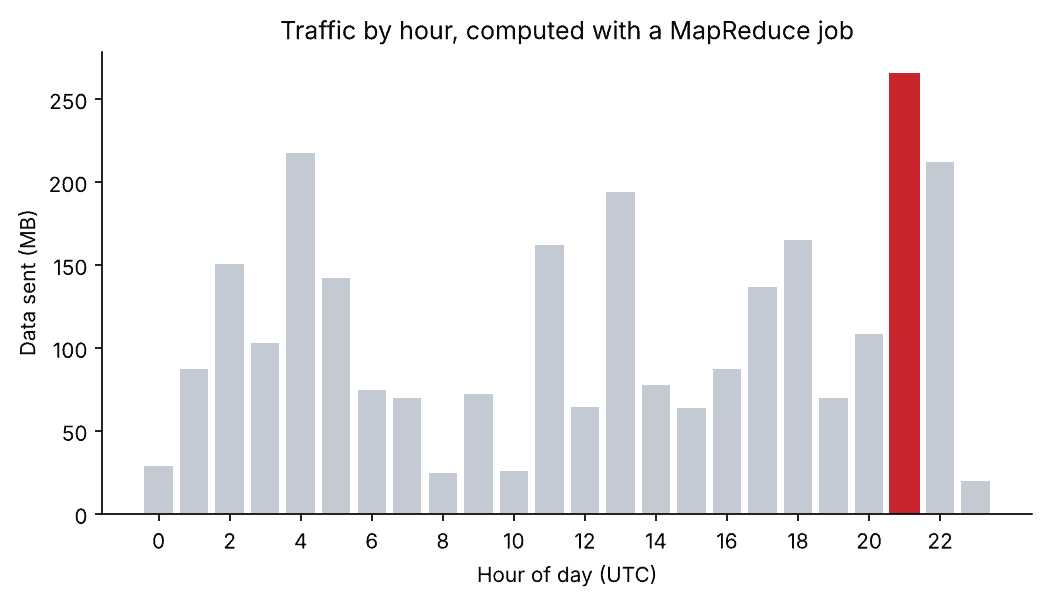
In total the server sent 2,620 MB, and the busiest hour was 21:00 UTC with 265 MB. The job reduced 10,000 lines to 24 numbers, and a result that small is easy to load into pandas and plot. This is the usual division of labour: the cluster does the heavy counting, and ordinary tools handle the summary.
8. Check the answer, and be honest about speed
A job tested on a sample should be checked against a simpler method. Here pandas can do the first job in a few lines:
Save this as check.py:
import re
import time
import pandas as pd

start = time.perf_counter()
LINE = re.compile(r'^(\S+) \S+ \S+ \[([^\]]+)\] "(\S+) (\S+)[^"]*" (\d{3}) (\S+)')
rows = [m.groups() for m in map(LINE.match, open("apache_logs")) if m]
df = pd.DataFrame(rows, columns=["ip", "time", "method", "path", "status", "size"])

print(df["status"].value_counts().sort_index().to_string())
print(f"{len(df):,} rows in {time.perf_counter() - start:.2f} seconds")
python3 check.pyOutput:
status
200    9126
206      45
301     164
304     445
403       2
404     213
416       2
500       3
10,000 rows in 0.02 seconds
The counts match exactly. Pandas is also much quicker here, at 0.02 seconds against roughly 0.15 for the piped scripts, and a real Hadoop cluster would take longer than either, because starting a job on a cluster takes many seconds before any data is read. For 10,000 lines, or ten million, Hadoop is the wrong tool. It earns its place when the data no longer fits on one machine, because the mapper and reducer above never need to hold the dataset in memory, while pandas must.
9. Run the same scripts on a real cluster
We did not run this last step: it needs a Hadoop cluster, which this tutorial does not assume you have. On a machine with Hadoop 3 installed, these standard commands copy the log into HDFS and submit the same two scripts as a streaming job:
hdfs dfs -mkdir -p /logs
hdfs dfs -put apache_logs /logs/

mapred streaming \
  -files mapper.py,reducer.py \
  -mapper mapper.py \
  -reducer reducer.py \
  -input /logs/apache_logs \
  -output /logs/status_counts

hdfs dfs -cat /logs/status_counts/part-00000
The first two commands create a folder in HDFS and upload the file, which HDFS splits into blocks and copies across machines. The streaming command ships the scripts to the cluster, runs a mapper on every block, shuffles the output and runs the reducer. The result is written to a new folder in HDFS, one part file per reducer. The scripts are the ones you already tested, unchanged.
Is Hadoop for big data analysis still worth learning?
Yes, but be clear about what you are learning it for. Few new projects write raw MapReduce jobs today. Most teams use Apache Spark, which follows the same split-and-combine idea but keeps data in memory and is far faster to write and to run, or a cloud data warehouse queried with SQL. Storage has shifted too, from HDFS towards cloud object stores.
However, the ideas you practised here are the foundation of all of those tools. Splitting data into blocks, mapping each block independently, shuffling by key and reducing are exactly what Spark does when you call groupBy, and what a warehouse does behind a GROUP BY. Many large companies also still run Hadoop clusters, often with Spark and Hive on top of HDFS and YARN, so the vocabulary appears in job descriptions and in existing systems you may have to maintain.
| If your data is… | A sensible tool |
|---|---|
| Up to a few gigabytes | pandas on one machine |
| Tens of gigabytes | A database or a single-machine engine such as DuckDB or Polars |
| Hundreds of gigabytes and more | Spark or a cloud data warehouse |
| Already in a Hadoop cluster | Spark or Hive on that cluster; streaming jobs like this one for simple tasks |
A sensible next step is the Spark tutorial, then our guides to data pipelines and AWS for data science. To try a real single-machine Hadoop without installing it, a container is the easiest route; see Docker for data science.
Related reading
- Apache Spark for big data analysis
- Big data vs small data
- Building and optimizing data pipelines
- Data manipulation with pandas
- The dark side of big data
FAQ
What is Hadoop used for?
Storing and processing datasets too large for one machine, such as web and application logs, clickstreams, sensor data and large archives. Typical jobs are counting, aggregating, filtering and joining very large files as batch work.
What are the main components of Hadoop?
HDFS stores files in blocks across many machines with several copies of each block. MapReduce is the model for processing those blocks in parallel. YARN schedules the work and shares out memory and CPU.
Can I use Python with Hadoop?
Yes. Hadoop Streaming runs any program that reads standard input and writes standard output, so the mapper and reducer can be plain Python scripts, as in this tutorial. PySpark is the other common route when Spark runs on the cluster.
What is the difference between Hadoop and Spark?
Hadoop MapReduce writes intermediate results to disk between steps, which is reliable but slow. Spark keeps data in memory where it can, which makes it much faster and easier to program. Spark often runs on a Hadoop cluster, using HDFS for storage and YARN for scheduling.
Do I need a cluster to learn Hadoop?
No. You can write and test streaming jobs with shell pipes, as shown here, and Hadoop can also run on a single machine for practice. A cluster only becomes necessary when the data is too big for one computer.
Is Hadoop still used?
Yes, mainly in large organisations with existing clusters, usually with Spark or Hive on top. New projects more often choose Spark with cloud storage or a cloud data warehouse, but they rely on the same ideas Hadoop introduced.
