
To build a chatbot with Python, you first need a way to decide what each message is trying to do. Everything after that, the replies, the fallbacks, the hand-off to a human, hangs on that one decision. This tutorial trains an intent model on 7,862 real chat messages, measures it against two baselines, shows exactly where it fails, and wraps it in a reply function. Every number below comes from running the code on 21 November 2026 with Python 3.13, scikit-learn 1.9.1 and pandas 3.0.5.
One limit up front: the labels in this data are dialogue acts such as greeting, question and statement, not business intents such as “reset password”. So the bot you build here can recognise what kind of message it received, but it cannot answer domain questions. That is deliberate. It lets us test every step on real, public data, and the same code works for business intents once you have your own labelled messages.
The data: real chat posts with dialogue-act labels
The NPS Chat corpus (distributed with NLTK) holds 10,567 posts from age-grouped online chat rooms, each hand-labelled with one of 15 dialogue acts. We download the zip straight from the NLTK data repository, drop the 2,632 “System” posts (join and part notices) and the two rarest acts (73 posts), and replace user names with the token USER. That leaves 7,862 posts in 12 acts.
We split by chat session, not at random: the last two of 15 sessions (871 posts) are the test set, so the model is judged on conversations it has never seen.
import io, re, zipfile, urllib.request
import xml.etree.ElementTree as ET
import pandas as pd
import scipy.sparse as sp
from sklearn.feature_extraction.text import TfidfVectorizer
from sklearn.linear_model import LogisticRegression
from sklearn.metrics import accuracy_score, f1_score, classification_report

URL = ("https://raw.githubusercontent.com/nltk/nltk_data/gh-pages/"
       "packages/corpora/nps_chat.zip")
zf = zipfile.ZipFile(io.BytesIO(urllib.request.urlopen(URL).read()))

rows = []
for name in sorted(n for n in zf.namelist() if n.endswith(".xml")):
    for post in ET.fromstring(zf.read(name)).iter("Post"):
        rows.append((post.get("class"), (post.text or "").strip(), name.split("/")[-1]))
df = pd.DataFrame(rows, columns=["act", "text", "session"])
print(len(df), "posts,", df.session.nunique(), "sessions")
print(df.act.value_counts().head(5).to_dict())

df = df[df.act != "System"].copy()          # join/part notices, not conversation
df["text"] = df.text.str.replace(r"\d\d-\d\d-\w+?User\d+", "USER", regex=True)
keep = ["Statement", "Greet", "Emotion", "ynQuestion", "whQuestion", "Accept",
        "Bye", "Emphasis", "Continuer", "Reject", "yAnswer", "nAnswer"]
df = df[df.act.isin(keep)]
sessions = sorted(df.session.unique())
train = df[~df.session.isin(sessions[-2:])]
test = df[df.session.isin(sessions[-2:])]
print(len(train), "train,", len(test), "test")
10567 posts, 15 sessions
{'Statement': 3185, 'System': 2632, 'Greet': 1363, 'Emotion': 1106, 'ynQuestion': 550}
6991 train, 871 testBaselines: guessing and keyword rules
Before training anything, find out what a lazy approach scores. Always answering “Statement”, the most common act, is right 44.2% of the time. A hand-written rule set, the classic first chatbot, does better: greet on “hi”, say bye on “bye”, call anything starting with “what” or “how” a question, and call a message with a question mark a yes/no question.
majority = train.act.value_counts().idxmax()
print("always", majority, "->", round(accuracy_score(test.act, [majority] * len(test)), 3))

def rules(text):
    words = re.findall(r"[a-z']+", text.lower())
    first = words[0] if words else ""
    if first in ("hi", "hello", "hey", "hiya", "sup", "yo", "heya", "howdy", "hola"):
        return "Greet"
    if any(w in words[:3] for w in ("bye", "cya", "gtg", "later", "goodnight", "night")):
        return "Bye"
    if first in ("what", "who", "where", "when", "why", "how", "which"):
        return "whQuestion"
    if "?" in text:
        return "ynQuestion"
    if first in ("lol", "haha", "hehe", "lmao"):
        return "Emotion"
    return "Statement"

pred = test.text.map(rules)
print("rules acc", round(accuracy_score(test.act, pred), 3),
      "macro F1", round(f1_score(test.act, pred, average="macro"), 3))
always Statement -> 0.442
rules acc 0.664 macro F1 0.294The rules reach 66.4% accuracy, but a macro F1 of 0.294 says they only handle a few acts. Accuracy alone flatters a model on imbalanced data, so we track macro F1, which weights all 12 acts equally.
Train an intent model with TF-IDF and logistic regression
The model turns each message into two sets of TF-IDF features, word one- and two-grams (keeping “?” and smileys as tokens) and character 2 to 4-grams, which cope with typos like “wut” and “heyyy”. A logistic regression then picks the act. If TF-IDF is new to you, our NLP with Python tutorial explains it from scratch.
words = TfidfVectorizer(ngram_range=(1, 2), min_df=2, sublinear_tf=True,
                        token_pattern=r"[A-Za-z']+|[?!.]|:\)|:\(")
chars = TfidfVectorizer(analyzer="char_wb", ngram_range=(2, 4), min_df=3, sublinear_tf=True)
def features(texts, fit=False):
    if fit:
        return sp.hstack([words.fit_transform(texts), chars.fit_transform(texts)]).tocsr()
    return sp.hstack([words.transform(texts), chars.transform(texts)]).tocsr()

clf = LogisticRegression(C=10, max_iter=2000).fit(features(train.text, fit=True), train.act)
Xte = features(test.text)
pred = clf.predict(Xte)
print("model acc", round(accuracy_score(test.act, pred), 3),
      "macro F1", round(f1_score(test.act, pred, average="macro"), 3))
print(classification_report(test.act, pred, digits=2))
model acc 0.786 macro F1 0.565
precision recall f1-score support
Accept 0.44 0.28 0.34 25
Bye 0.93 0.50 0.65 26
Continuer 0.33 0.08 0.12 13
Emotion 0.83 0.79 0.81 121
Emphasis 0.73 0.30 0.42 27
Greet 0.88 0.95 0.92 97
Reject 0.43 0.23 0.30 13
Statement 0.76 0.92 0.83 385
nAnswer 0.67 0.55 0.60 11
whQuestion 0.90 0.83 0.86 64
yAnswer 0.33 0.14 0.20 14
ynQuestion 0.83 0.64 0.72 75
accuracy 0.79 871
macro avg 0.67 0.52 0.57 871Accuracy rises from 66.4% to 78.6% and macro F1 from 0.294 to 0.565. Word features alone, with no character n-grams, scored 76.2% accuracy in the same experiment, so the character features add about two points.
Where the chatbot fails
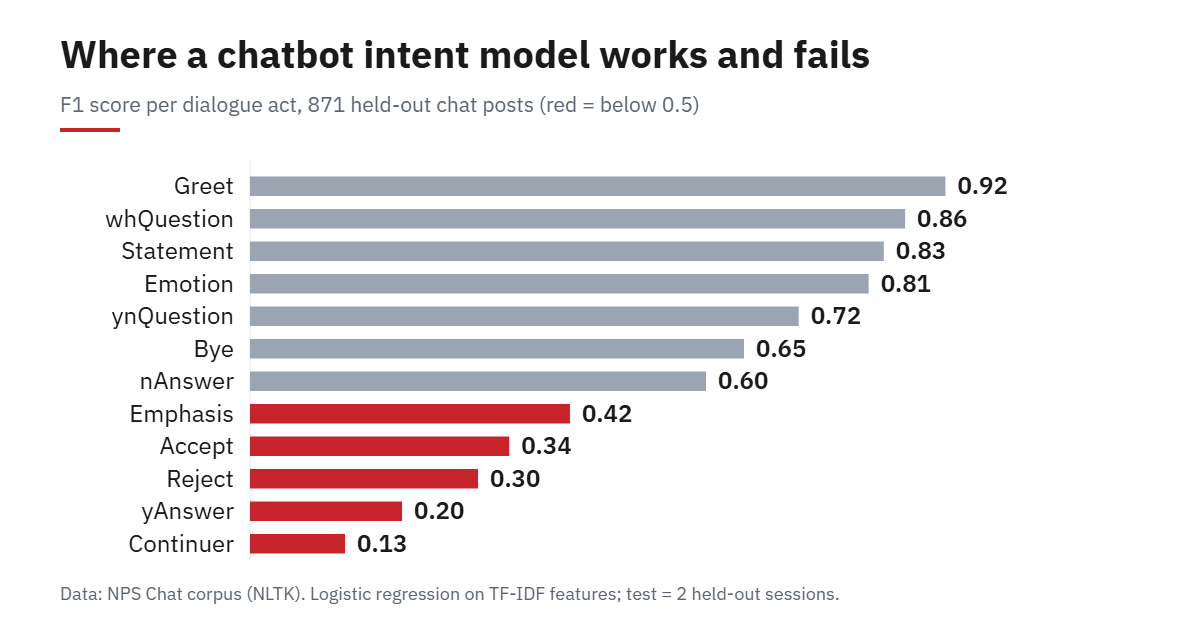
The headline 78.6% hides a split. Greetings (F1 0.92), wh-questions (0.86) and statements (0.83) work well because they have recognisable words. The acts that depend on context do not: only 1 of 13 “Continuer” posts and 2 of 14 yes-answers were found. A message like “yeah” or “totally” is an answer to whatever came before it, and a model that reads one message at a time cannot know that. The same goes for “Bye”: precision is 0.93 but recall only 0.50, because 11 of the 26 goodbyes were labelled as plain statements, for example “see ya’ll when the weekend is over”.
If your bot needs to handle follow-ups, give the model the previous message as an extra feature, or keep a conversation state. A single-message classifier is a good first layer, not a whole dialogue system.
Know when not to answer: a confidence threshold
A chatbot that is wrong with confidence is worse than one that asks again. predict_proba gives a confidence for every message, so we can refuse to answer below a cut-off. On the test set, trading coverage for accuracy looks like this:
conf = clf.predict_proba(Xte).max(axis=1)
for t in (0.0, 0.5, 0.6, 0.7):
    m = conf >= t
    print(f"threshold {t}: answers {m.mean():.1%}, accuracy on those {accuracy_score(test.act[m], pred[m]):.1%}")
threshold 0.0: answers 100.0%, accuracy on those 78.6%
threshold 0.5: answers 93.5%, accuracy on those 80.6%
threshold 0.6: answers 88.5%, accuracy on those 82.7%
threshold 0.7: answers 81.3%, accuracy on those 85.0%At 0.7 the bot declines to answer almost one message in five, and accuracy on the rest improves by 6.4 points. The right threshold depends on the cost of a wrong reply versus an unnecessary “could you rephrase?”. We use 0.5 below.
Turn the model into a chatbot with Python
The last step maps each predicted act to a canned reply and falls back to a clarifying question when confidence is low. This is the whole “chatbot”: a classifier, a lookup table and a threshold.
REPLIES = {"Greet": "Hello! What would you like to know?", "Bye": "Goodbye, talk soon.",
           "whQuestion": "Good question. I can't look that up yet, but I can log it for a human.",
           "ynQuestion": "Probably, but I'm not sure. Can you give me more detail?",
           "Emotion": "Glad to hear it.", "Accept": "Great.", "Reject": "Okay, no problem.",
           "Statement": "Got it. Tell me more.", "Emphasis": "I hear you.",
           "Continuer": "Go on.", "yAnswer": "Okay.", "nAnswer": "Okay."}

def reply(message, threshold=0.5):
    probs = clf.predict_proba(features([message]))[0]
    best = probs.argmax()
    act = clf.classes_[best]
    if probs[best] < threshold:
        return act, probs[best], "Sorry, I didn't catch that. Could you rephrase?"
    return act, probs[best], REPLIES[act]

for msg in ["hello there", "hi, anyone here?", "what time does the store open?",
            "do you ship to canada?", "bye for now", "thanks, that was great",
            "i want to return my order", "how do i reset my password", "lol", "asdkjh qwe"]:
    act, p, answer = reply(msg)
    print(f"{msg!r} -> {act} ({p:.2f}) | {answer}")
'hello there' -> Greet (0.99) | Hello! What would you like to know?
'hi, anyone here?' -> ynQuestion (1.00) | Probably, but I'm not sure. Can you give me more detail?
'what time does the store open?' -> whQuestion (0.95) | Good question. I can't look that up yet, but I can log it for a human.
'do you ship to canada?' -> ynQuestion (0.98) | Probably, but I'm not sure. Can you give me more detail?
'bye for now' -> Bye (0.88) | Goodbye, talk soon.
'thanks, that was great' -> Statement (0.99) | Got it. Tell me more.
'i want to return my order' -> Statement (0.95) | Got it. Tell me more.
'how do i reset my password' -> whQuestion (0.43) | Sorry, I didn't catch that. Could you rephrase?
'lol' -> Emotion (1.00) | Glad to hear it.
'asdkjh qwe' -> Statement (0.70) | Got it. Tell me more.Read these ten lines critically. Most behave sensibly. “hi, anyone here?” is a greeting that the model calls a yes/no question because of the question mark. “thanks, that was great” is filed as a plain statement. The nonsense string “asdkjh qwe” gets a confident 0.70 as a statement, and a confidence threshold cannot catch that, because the model has never been taught that gibberish exists. Testing a bot on a dozen hand-written messages like these tells you more than another decimal of accuracy.
From this demo to a real chatbot
- Label your own intents. Collect 20 to 50 real messages per intent (refund, delivery, password) and retrain the same pipeline. Retraining takes seconds, and the evaluation code above stays the same.
- Add a gibberish class and a human hand-off. Include some random and off-topic messages as their own “unknown” class, and route low-confidence messages to a person.
- Serve it. Save the fitted pipeline with joblib and put it behind an API; our Flask deployment guide shows the pattern, with tests.
- Combine it with sentiment. Detecting an angry customer is a separate model; see sentiment analysis with Python and building a model with scikit-learn for the evaluation habits used here.
For generated, open-ended answers you would call a large language model instead. We did not test one here, so this tutorial makes no claim about how it would compare on this data.
FAQ
What is the easiest way to build a chatbot with Python?
A rule-based bot with if-statements is the quickest to start, and as the baseline above shows, it reaches 66.4% accuracy on this data but only 0.294 macro F1. A TF-IDF intent classifier is the next step and takes about 30 lines.
Do I need NLTK or a chatbot framework?
No. Here NLTK only supplied the dataset. The model uses scikit-learn, and the loop is plain Python.
Can this chatbot answer customer questions?
Not yet. It recognises that a message is a question, not what the answer is. To answer, you would add intents for your own topics and a reply or a lookup for each, or retrieve from a knowledge base.
How accurate does an intent model need to be?
It depends on the cost of a wrong reply. Use the confidence threshold to trade coverage for accuracy, and measure it on conversations the model has not seen, as we did by holding out whole sessions.
